
How to Set Up an Effective Ticketing Process for SAP AMS (Application Management Services)

In the modern and challenging world of digital development, where the SAP S/4HANA environments become the obvious target of attention, the technical skills are not enough as a streamlined and responsive process of the Application Management Services (AMS) is needed to cope with the technological challenges. An effective ticketing system that will assist in the quick resolution of the problem and will facilitate transparency and subsequent improvement must be regarded as one of the most critical parts of the AMS success.
This Prime S4 guide will take you through the steps of developing a strong ticketing procedure within SAP AMS that, on top of increasing the quality of services and limiting downtimes, will put the IT operations in line with the business goals.
What Is SAP AMS and Why Does Ticketing Matter?
SAP Utilities combines and optimizes SAP applications after they have been implemented. This practice is called the SAP Application Management Services (AMS). It consists of incident management, problem resolution, system monitoring, change management and continuous improvement.
A ticketing process then is the organised scheme that captures, classifies, appropriates, keeps track of and closes support problems elevated by end-users or by system alerts. Lack of a proper ticketing system means that SAP AMS can be continuously messy resulting in unmet SLAs, issues that are not addressed, and undersatisfied users.
Key Objectives of a Ticketing Process in SAP AMS
- Minimize Downtime: Quicker identification and resolution of incidents.
- Ensure Accountability: Clear ownership and SLA tracking.
- Enable Transparency: Real-time visibility for all stakeholders.
- Facilitate Continuous Improvement: Capture root causes and trends for long-term fixes.
- Improve User Experience: Timely, informed responses to user queries.
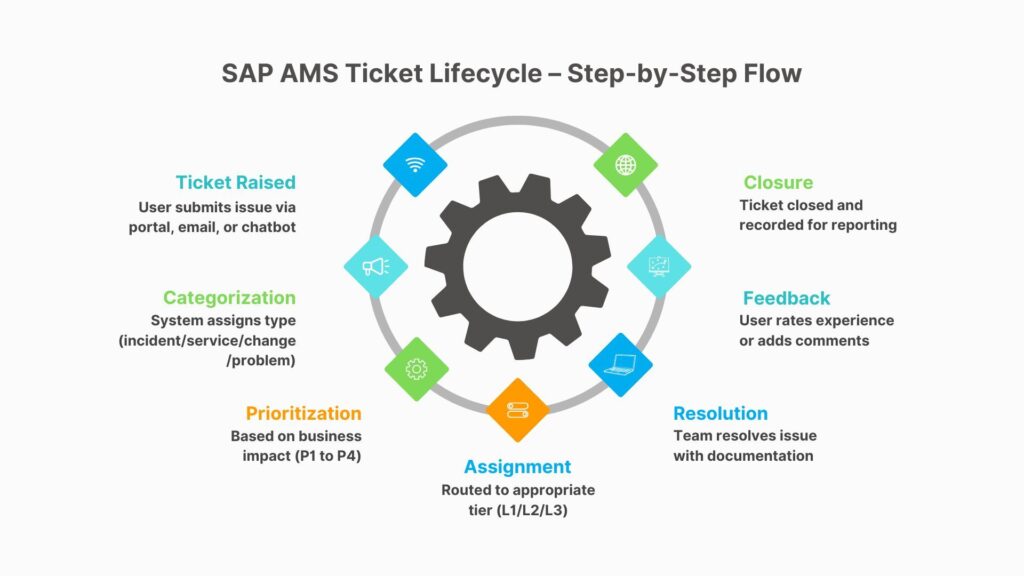
Step-by-Step Guide to Setting Up an Effective Ticketing Process
1. Choose the Right Ticketing Tool
Select a robust ITSM (IT Service Management) tool that integrates seamlessly with SAP. Popular tools include:
- SAP Solution Manager (SolMan)
- ServiceNow
- BMC Remedy
- JIRA (with AMS extensions)
Prime S4 Tip: If your team uses SAP Solution Manager, enable the ITSM module for native SAP compatibility and traceability.
2. Define Ticket Categories and Priorities
Clearly outline the types of tickets:
- Incident Tickets (break/fix issues)
- Service Requests (access, reports)
- Change Requests (enhancements, system changes)
- Problems (recurring issues requiring root cause analysis)
Assign priority levels based on:
- Business impact
- Urgency
- Downtime tolerance
3. Create a Centralized Ticket Submission Channel
Make it easy for users to raise tickets through:
- Self-service portals
- Email triggers
- Chatbots
- SAP Fiori-based interface
Best Practice: Include mandatory fields like module, issue type, error screenshots, and impact description to speed up triage.
4. Establish a Tiered Support Model
Segment support into three levels:
L1 Support: Initial triage, user communication, basic troubleshooting.
L2 Support: Functional and technical analysis, configuration changes.
L3 Support: Deep-dive development support (ABAP, enhancements, OSS notes).
Ensure automatic ticket routing based on issue type and complexity.
5. Set Up SLA Monitoring and Escalation Matrix
To ensure compliance with timelines, integrate SLA tracking and define clear escalation points for overdue tickets. Automate reminders and escalations to supervisors or service leads when SLAs are breached.
Escalation Flow Example:
L1 not resolved in 4 hrs → Escalated to L2 Manager
L2 not resolved in 8 hrs → Escalated to AMS Head

6. Enable Real-Time Dashboards and Reporting
Use dashboards to track:
- Open tickets by priority
- Average resolution time
- SLA compliance
- Reopen rates
This helps AMS leaders make informed decisions and continuously improve the support model.
7. Implement Feedback Loops
Once tickets are resolved, request user feedback to assess:
- Satisfaction level
- Communication clarity
- Timeliness and effectiveness
Analyze feedback monthly to identify areas of improvement in both processes and personnel.
Optional Enhancements for Ticketing Excellence
- Chatbot for L1 Ticketing: Use AI to resolve FAQs and create tickets automatically.
- Knowledge Base Integration: Offer self-service guides linked to known issues.
- Automation: Auto-close duplicate tickets or trigger workflows for repetitive tasks.
Real-World Insight: Prime S4 AMS in Action
At Prime S4, our SAP AMS clients benefit from a customized ticketing workflow integrated with SAP Fiori dashboards, real-time status alerts, and proactive escalation handling. Our structured ticket lifecycle ensures that every issue—big or small—is tracked, addressed, and closed efficiently with documentation and learning retained for future use.
Final Thoughts
An effective SAP AMS ticketing process isn’t just about tracking issues—it’s about maximizing system performance, empowering users, and supporting business continuity. Whether you’re just starting your AMS journey or optimizing your current support model, building a structured, automated, and user-centric ticketing process is essential.
At Prime S4, we help businesses of all sizes implement smart SAP support models tailored to their unique needs. Need help setting up or optimizing your SAP AMS process?
Contact Prime S4 – Your Partner in Expert SAP Support.
 English
  French
  Spanish
  Portuguese