
EWM Support: Interface Failures in SAP EWM
What to Monitor and How to Fix Them Like an Expert
In a real-world SAP EWM landscape, interfaces are the backbone of warehouse operations. Whether it is ERP integration, external carrier systems, automation equipment, or third-party logistics partners, SAP EWM constantly exchanges data with multiple systems.
When these interfaces fail, the impact is immediate and operationally visible — deliveries stop, queues pile up, confirmations don’t post, and warehouse teams are left waiting.
This article breaks down common SAP EWM interface failures, what you should monitor proactively, and how to fix issues efficiently from an EWM support consultant’s perspective.
Why Interface Stability Is Critical in SAP EWM
- SAP EWM is not a standalone system. It relies heavily on seamless integration with:
- SAP ECC or S/4HANA for deliveries and stock
- TM for transportation planning
- Automation systems like conveyors and ASRS
- External carriers, couriers, and WMS systems
- Yard Management and Quality systems
Even a small interface disruption can lead to:
- Blocked outbound deliveries
- Incomplete inbound processing
- Inventory mismatches
- Manual workarounds and operational delays
That’s why interface monitoring is a daily responsibility, not a reactive task.
Common Interface Types in SAP EWM
Before diving into failures, it’s important to understand the main interface categories in EWM:
1. ERP–EWM Integration (Core Interface)
This includes:
- Inbound deliveries
- Outbound deliveries
- Stock transfers
- Posting changes
These are typically IDoc or qRFC-based.
2. qRFC Communication
Used extensively between ERP and EWM to ensure data consistency and sequencing.
3. PPF and Output Management Interfaces
For printing, label generation, and external communication triggers.
4. External System Interfaces
Includes:
- PLC and MFS systems
- Carrier systems
- Third-party logistics providers
Most Common Interface Failures in SAP EWM
1. qRFC Queue Failures
Symptoms
- Deliveries stuck in ERP or EWM
- No updates despite successful posting on one side
- SMQ1 or SMQ2 queues in error
Root Causes
- Master data inconsistencies
- Short dumps in background
- Lock conflicts
- Missing customizing
What to Monitor
- Transaction SMQ1 (Outbound queues)
- Transaction SMQ2 (Inbound queues)
- Queue status and repeated retries
How to Fix
- Analyze error text directly in the queue
- Check ST22 for dumps
- Correct master data or customizing
- Restart queues carefully after resolution
2. IDoc Processing Errors
Symptoms
- Inbound or outbound deliveries not created
- IDocs stuck in status 51 or 64
Root Causes
- Missing partner profiles
- Incorrect message type configuration
- Inconsistent material or location data
What to Monitor
- WE02 / WE05 for IDoc status
- BD87 for reprocessing
- Partner profile settings in WE20
How to Fix
- Read the detailed IDoc error segment
- Correct data or configuration
- Reprocess using BD87
3. Delivery Distribution Failures
Symptoms
- ERP delivery created but not visible in EWM
- Partial delivery replication
Root Causes
- Incorrect warehouse number assignment
- Queue stuck due to earlier errors
- Incomplete integration model activation
What to Monitor
- /SCWM/PRDI and /SCWM/PRDO
- CIF queue status
- Integration model activation
How to Fix
- Validate warehouse mapping
- Reprocess failed queues
- Check ERP–EWM integration settings
4. External System Communication Failures
Symptoms
- No confirmation from automation systems
- Tasks not getting confirmed
- Equipment communication stops
Root Causes
- Network issues
- Message format mismatch
- System downtime
What to Monitor
- Application logs in SLG1
- MFS monitor transactions
- Interface middleware logs
How to Fix
- Coordinate with technical and automation teams
- Validate message structure
- Restart failed interface services
5. PPF Action Failures
Symptoms
- Labels not printing
- No output triggered for deliveries or tasks
Root Causes
- PPF action profile misconfiguration
- Printer or RFC destination issues
What to Monitor
- PPF logs
- SPAD printer configuration
- Action processing status
How to Fix
- Re-trigger PPF actions
- Correct printer or RFC issues
- Validate action conditions
Proactive Monitoring: What Every EWM Support Team Should Track
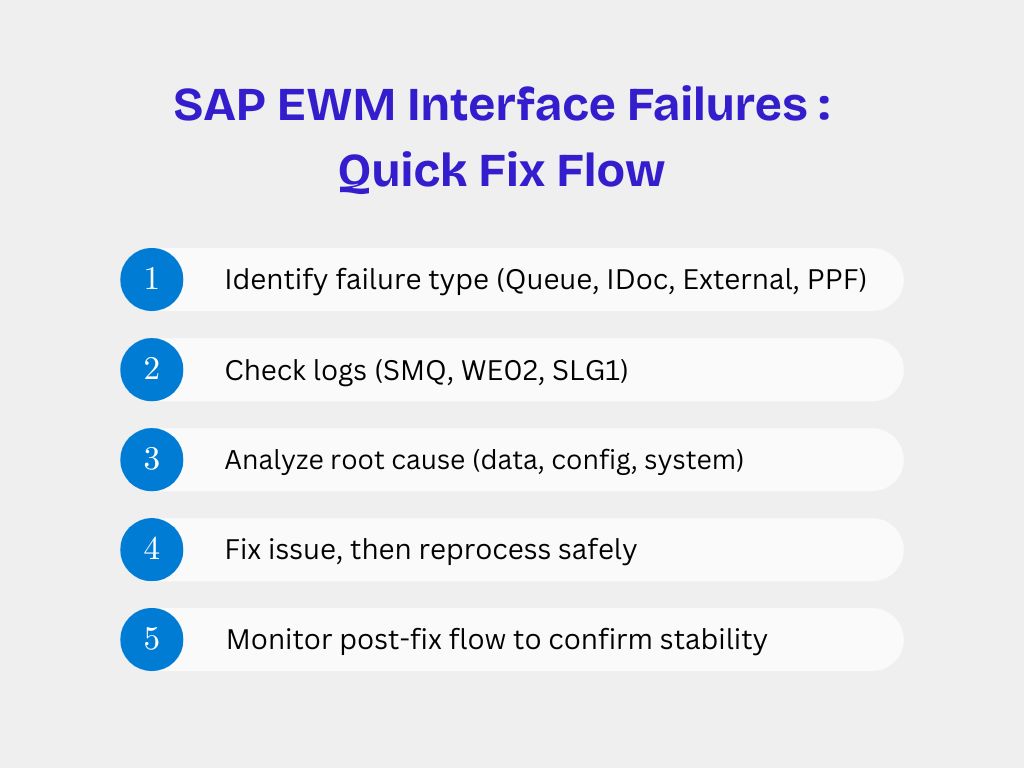
A strong EWM support process includes daily interface monitoring:
- SMQ1 / SMQ2 queue health
- IDoc error volume
- SLG1 application logs
- Failed PPF actions
- Background job status
- Automation system acknowledgments
Proactive monitoring prevents minor issues from turning into warehouse shutdowns.
Best Practices to Avoid Repeated Interface Failures
- Keep master data consistent across ERP and EWM
- Avoid manual queue deletions
- Always analyze root cause before restarting queues
- Maintain clear error handling SOPs
- Schedule regular interface health checks
- Coordinate closely with Basis and integration teams
Final Thoughts
Interface failures in SAP EWM are not just technical issues — they directly affect warehouse productivity and business continuity. A strong EWM support team doesn’t just fix errors; it anticipates failures, monitors proactively, and resolves issues with minimal operational impact.
By understanding where to look, what to monitor, and how to respond, SAP EWM consultants can ensure smooth, uninterrupted warehouse operations even in complex integrated landscapes.
 English
  French
  Spanish
  Portuguese