
Inbound Process Optimization in SAP EWM: From ASN to Goods Receipt
Introducción
Inbound logistics is where warehouse efficiency truly begins. Delays, inaccuracies, or manual work at the inbound stage ripple through putaway, picking, inventory accuracy, and even outbound fulfillment. In many SAP EWM implementations, the inbound process exists but it is not optimized.
As an SAP EWM professional working closely with real warehouses, I’ve seen one consistent truth: a well-designed inbound flow from ASN to Goods Receipt (GR) can reduce handling time by 30–40%, improve stock accuracy, and stabilize warehouse operations.
This article breaks down the end-to-end inbound process in SAP EWM, highlights common operational gaps, and shares practical optimization strategies that actually work on the warehouse floor.
Understanding the SAP EWM Inbound Flow
Before optimizing, it’s important to understand how SAP EWM manages inbound logistics at a process level.
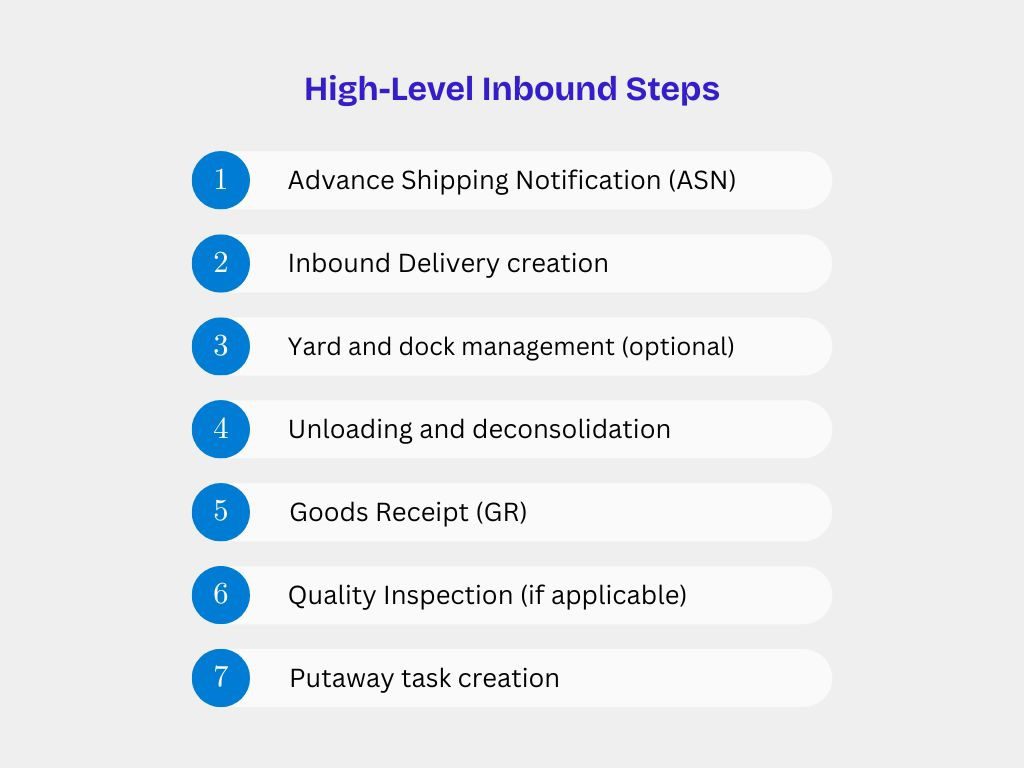
Each of these steps can be automated, controlled, and optimized—if designed correctly.
Step 1: Advance Shipping Notification (ASN) – The Foundation
ASN is the trigger for proactive inbound planning. Whether coming from SAP S/4HANA, ECC, or an external supplier system, ASN quality directly impacts warehouse efficiency.
Best Practices for ASN Optimization
- Enforce mandatory ASN fields: quantity, HU structure, batch, expiry
- Use inbound delivery creation via IDoc / API rather than manual entry
- Validate ASN data before posting to EWM
- Reject incomplete ASNs early to avoid downstream errors
Expert Tip:
Warehouses that rely on last-minute deliveries without ASN visibility often face dock congestion and labor imbalance. ASN discipline is non-negotiable.
Step 2: Inbound Delivery in SAP EWM
Once the ASN is received, SAP EWM creates an Inbound Delivery Notification (IDN) or Inbound Delivery.
Key Configuration Areas
- Document type determination
- Warehouse process type (WPT) assignment
- HU relevance
- Putaway strategy linkage
Optimization Opportunities
- Pre-determine storage type using product and supplier data
- Activate automatic WT creation where business allows
- Use delivery-based slotting for faster decisions
A clean inbound delivery ensures downstream tasks flow without manual intervention.
Step 3: Dock & Yard Management (Optional but Powerful)
For high-volume warehouses, Dock Appointment Scheduling y Gestión del patio add significant value.
Optimization Strategies
- Assign dock doors based on product group or temperature zone
- Sequence unloading using appointment slots
- Reduce waiting time for vehicles
- Improve coordination between security, warehouse, and transport teams
This step is often skipped—but in reality, it’s where time savings begin.
Step 4: Unloading & Deconsolidation
At this stage, physical execution meets system logic.
Execution Best Practices
- Use RF devices for unloading confirmation
- Scan HUs instead of line-item confirmation
- Capture discrepancies immediately
- Separate deconsolidation zones for mixed pallets
Common Issues
- Manual confirmations
- Late discrepancy identification
- Incorrect HU structures
Optimized unloading ensures clean GR posting and faster putaway.
Step 5: Goods Receipt (GR) – More Than Just a Posting
GR is not just an accounting step; it defines stock ownership, availability, and quality status.
GR Posting Options
- GR at delivery level
- GR at HU level
- GR with or without QM integration
Optimization Best Practices
- Use GR by exception where possible
- Automate GR for trusted suppliers
- Enable tolerance handling
- Avoid manual GR unless absolutely required
Expert Insight:
Incorrect GR design is one of the top reasons for stock mismatches between EWM and S/4HANA.
Step 6: Quality Inspection Integration (If Applicable)
For regulated industries, quality checks are mandatory—but they don’t have to slow operations.
Optimization Techniques
- Trigger QM only for selected products or suppliers
- Use sampling procedures instead of 100% inspection
- Automatically move stock to inspection storage types
- Enable early putaway for non-critical SKUs
Balancing compliance and speed is key.
Step 7: Putaway Task Creation & Execution
Putaway is where inbound efficiency becomes visible.
Putaway Optimization Strategies
- Use warehouse process types aligned with material flow
- Implement slotting & rearrangement
- Apply fixed bin or dynamic bin strategies
- Prioritize putaway based on outbound demand
Automation Options
- Automatic WT creation at GR
- System-driven bin determination
- RF-guided execution
Well-designed putaway reduces travel time and boosts picking efficiency later.
Common Inbound Issues Seen in Real Projects
Despite having SAP EWM, many warehouses face:
- Manual GR postings
- Poor ASN quality
- Uncontrolled putaway
- Stock discrepancies
- High inbound dwell time
These are not system limitations they are design and process issues.
Key KPIs to Measure Inbound Optimization
To ensure continuous improvement, track:
- ASN accuracy rate
- Dock-to-stock time
- GR posting time
- Inbound discrepancy rate
- Putaway completion time
SAP EWM provides standard tools to monitor all of these.
Final Thoughts: Inbound Excellence Starts with Design
Inbound optimization in SAP EWM is not about adding complexity—it’s about designing smart, executable processes that align system logic with warehouse reality.
From ASN discipline to automated GR and intelligent putaway, every step matters. When inbound is optimized, the entire warehouse benefits—inventory accuracy improves, outbound stabilizes, and operational stress reduces.
En PrimeS4, we help businesses move beyond “working EWM systems” to high-performance warehouse operations through process-driven SAP EWM design.
 English
  French
  Spanish
  Portuguese